Archive for the ‘adsl’ tag
BT Fail :: Part 2
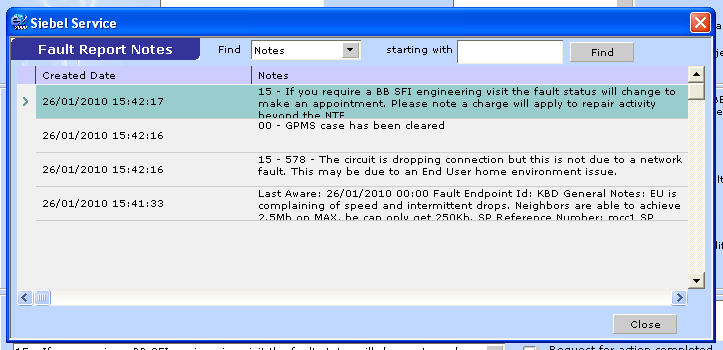
A new level of fail from our friends at BT Wholesale. They have actually willingly provided proof that they do not read fault reports the first time around:
Yes.. that is a grand total of 43 seconds from reporting the fault to BT Wholesale rejecting it. This was even reported via KBD, which lets you confirm that the user has already attempted to replace his router, cables, filters and even tried from the test socket. 43 seconds is not enough time for most people to type that long-winded reply about SFI appointments, let alone for BT to run the necessary diagnostics to determine if there is a fault or not.
At my place of work we have suspected that BT was doing this for a long time as all too often, and 9 times out of 10 blatently obvious faults are rejected with the message “not due to a network fault”. Now I have a handful of faults, some where it was customer some, but some where there was genuine faults such as the DSLAM being faulty where BT has denied anything being wrong and cleared the fault in less than a minute.
Further musings on measuring bandwidth
A few further thoughts on things that people forget to take into account when attempting to measure bandwidth:
- When measuring bandwidth, attempt to use a site or tool that is close to your ISP. If you’re in the UK and you try to test your connection using a site hosted in the US it’s never going to give you a decent idea of your speed. I recommend Speedtest.net, as it’s a single tool that can test to a multitude of different locations and will give you a much better idea of exactly how your line is performing.
- Remember to allow around 10% for overheads. An 8Mb ADSL line will top out at 7.2Mbps. This is due to overheads for the ADSL line itself: a certain amount of bandwidth is required to manage your packets that will not be visible on any web-based bandwidth test.
- Any download requires a certain amount of packets to be sent in the opposite direction. Usually these are acknowledgement packets to assure the server you are downloading from that everything is being received okay (or not, as the case may be). Again, that magic 10% figure is the one to watch out for. A 1Mbps download will roughly need a 100Kbps upload. If you are using up all your upload bandwidth, your download bandwidth will be poor.
Measuring bandwidth
An issue that comes up for me at work time and time again is customers misunderstanding how bandwidth is measured.
ZyXEL 660R Half-Bridge Mode
A common problem with ADSL in the UK is that most connections are still using PPPoA. This means that if you want a computer to have a public IP address on one of these connections, you need to either have a block of IP addresses routed by your ISP to your router (at extra) cost, or you use a USB modem. There’s no real option for those folks that want to connect something like a SonicWall or any other firewall device directly to the line.